Show The Real Task
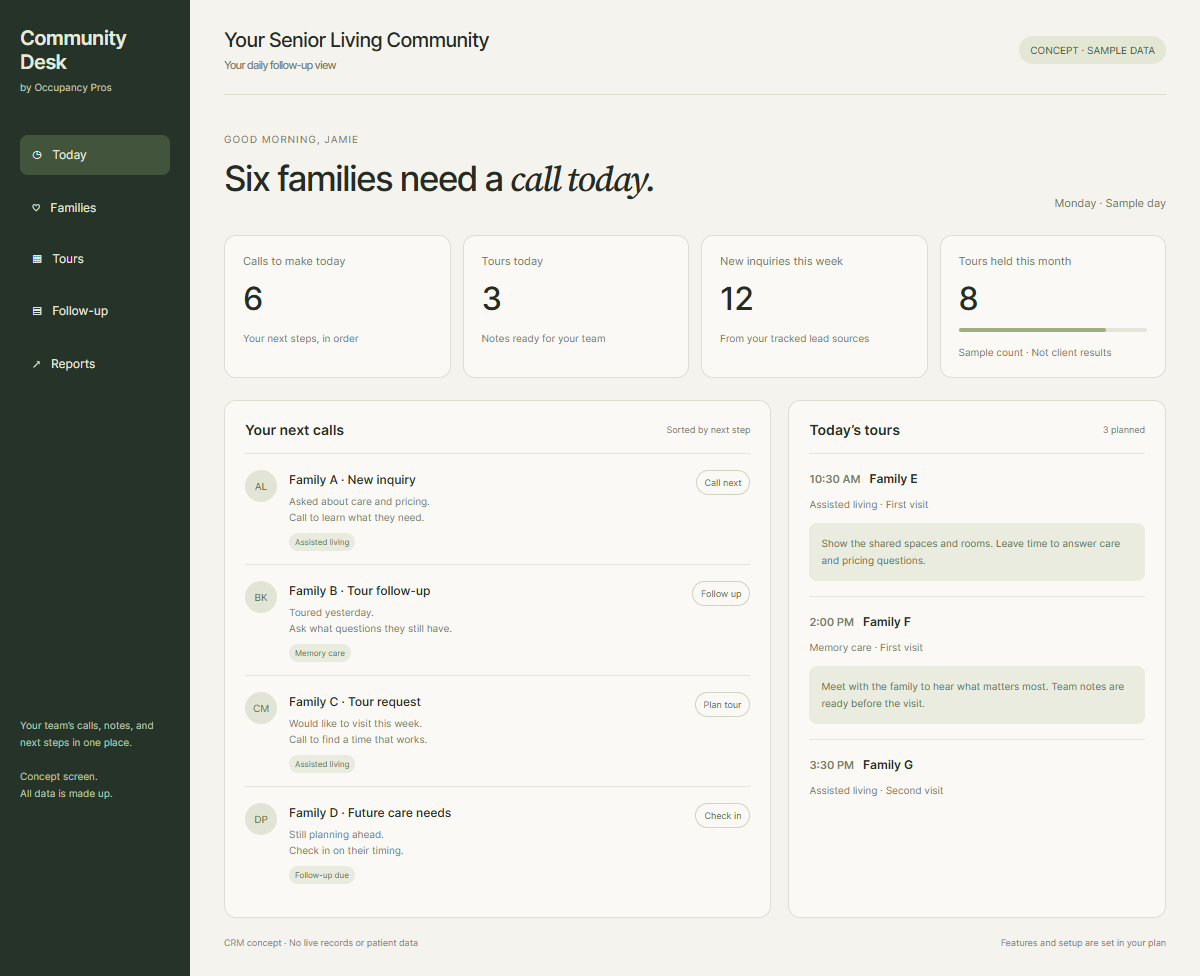
Staff adds a note and finds the next call.
Save what you saw.
Choose Senior Living CRM Software
Compare senior living CRM software with real staff tasks. Test calls, tours, waitlists, reports, and exports before you agree to a plan.
Compare actual demos · No vendor ranking
Type in the cells. Use task references, not private family or care details. Your edits stay on this page until you reload; download to keep them.
| Task to show | Provider A evidence | Provider B evidence | Staff rating | Open question |
|---|---|---|---|---|
Find a family record | ||||
Record a held tour | ||||
Set the next staff call | ||||
Export contacts and notes |
Swipe the table to edit more fields.
A tool should make daily follow-up easier. We can review your staff tasks, existing accounts, and handoff needs before proposing CRM setup and training.
See The Related Work ↗Run the same daily task.
Keep evidence from both demos.
Check written costs and exports.
A Staff-Task Buyer Guide
Staff adds a note and finds the next call.
Include setup, software, support, and migration.
Check which records leave with your account.
A feature list can hide a hard daily workflow. Ask staff to describe what happens from the first call through a tour and a later check-in. Choose the tasks that often get missed. A CRM should support that work without forcing your team to enter the same facts in several places. For example, finding yesterday’s tour notes should be quick enough for a staff member covering another shift. A polished dashboard does not prove that.
The supplied October 2026 research names WelcomeHome, Aline, Enquire, Sherpa, Yardi, and the Occupancy Pros option for review. That list is a starting point, not a current product ranking. Confirm today’s product names, packaging, support, and features directly with each provider before treating any row as settled. One provider may demonstrate a task that another only describes. Keep those differences visible rather than awarding both the same score during the review.

Ask the presenter to move a family from inquiry to tour, then to a later check-in. Change the timing and see who gets the next task. A list of names is not a usable waitlist if staff cannot see care needs, contact wishes, or the last conversation. A family that delays moving for six months needs a different next date from one asking to visit tomorrow. Test both situations.
A monthly price alone does not show the full cost. Ask about setup, training, user limits, messaging, calls, data transfer, connections, and exit work. Do not assume a sales CRM includes clinical records or replaces your care system. Put every needed connection and ongoing charge into the written scope. An included connection can still need paid setup or separate support. The proposal should explain who fixes the problem when records stop moving.
Your records need to remain useful if a staff member leaves or a provider changes. Test permissions, reports, and export steps before signing. Ask what happens to notes, files, task dates, and source history after export. A flat contact list may not preserve the full story your team needs. Have a different staff member open the exported file. If they cannot tell which notes belong to which family, the exit test is incomplete.
Research you can inspect
| Demo task | What staff should check | Evidence to keep |
|---|---|---|
| New inquiry | One entry with an assigned next call | Completed live test |
| Tour change | Notes and next steps stay visible | Changed appointment |
| Waitlist check-in | Timing and contact wishes are clear | Follow-up task |
| Source report | Known and unknown sources stay separate | Report with field definitions |
| Exit | Useful records can be exported | Test export and written terms |
Clear answers before you call
Compare staff tasks, total costs, record access, and proof from each provider.
A senior living CRM keeps inquiry contacts, conversation notes, tour steps, sources, and next actions together for sales staff. It helps the team see who needs a reply and what was agreed. A sales CRM serves a different job from clinical records or a resident care plan.
The best senior living CRM is the one your staff can use for the tasks your community needs. Give each provider the same inquiry, tour, waitlist, and export test. Compare demonstrated work, written costs, and support before choosing. This guide does not award a current best product.
Use the same demo brief for WelcomeHome, the other providers you shortlist, and the Occupancy Pros option. Have staff enter a test inquiry, change a tour, find the last note, and export the record. Mark anything untested as an open question rather than assuming a feature is included.
Look for clearer next calls, easier access to tour notes, less repeated entry, and a handoff another staff member can cover. Test those benefits using your own sample workflow. A long feature list is less useful than watching a staff member complete a common task without help.
Test the care setting you actually serve. Assisted living staff may need to route care questions, while independent living staff may follow interest over a longer period. The product name does not settle fit. Show your real stages and check who can find the next step in each one.
Ask for a report showing inquiries, known and unknown sources, tours booked, tours held, and move-ins for a clear period. Check the field definitions and open a sample record behind a total. Useful reporting lets your team explain the count and choose an action from it.
List the website, phone, calendar, email, and care tools that must connect. Ask the provider to show the needed connection and explain any setup or ongoing cost. Confirm who notices and fixes failed transfers. Do not assume a sales CRM replaces the systems your care team uses.
Use the same period and number of communities for every quote. Include setup, software, users, training, messages, calls, data transfer, support, and exit costs where charged. Ask which items are included and which can change. Compare the whole written scope rather than only the monthly price.
Include the staff who answer inquiries, host tours, cover absences, and review reports. Give each person one common task to try. Ask where they needed help and whether the next action stayed clear. Leaders should review their evidence alongside costs and account terms before making the final choice.
Export a test contact with notes, dates, sources, and task history, then ask another staff member to read it. Check which details are missing and which format is provided. Get the exit steps, timing, and costs in writing before signing so your team can plan a later change.
Start with a conversation
Tell us what needs work. We’ll talk through how marketing and CRM could help your team.